
No products in the cart.

Dash Cam for Mini Cooper: A UK Buying Guide
Choosing a dash cam for Mini Cooper models requires careful planning around compact cabin proportions, windscreen layout, and modern onboard electronics. Camera placement, cable routing, and power management must suit your specific model, whether you drive a 3-door hatch, 5-door hatch, Clubman, Countryman, or Convertible.
A properly installed dash cam delivers reliable front or dual-channel footage without obstructing your view or compromising vehicle safety systems. Safe and Sound Mobile installs dash cams and security systems across the UK. Choosing the right hardware depends on your driving habits, parking environment, and power requirements.
This guide explains how to assess camera coverage, essential recording features, safe installation arrangements, and battery protection before choosing a system for your Mini.
Which Camera Setup Suits Your Driving and Parking?
Your driving patterns and parking circumstances determine whether single-channel or dual-channel coverage makes practical sense. Each setup brings specific installation considerations depending on the Mini body style.
When Is a Front Camera Enough?

A single front-facing camera captures traffic conditions, lane positioning, and incidents occurring directly ahead of your vehicle. It suits drivers who primarily travel on motorways and park in secure, off-street locations.
Front-only systems also keep installation simple. There is only a single cable run to manage along the headlining and down the A-pillar to the power source.
Why Choose Front and Rear Coverage?
A dual-channel system adds a rear-facing camera to record the road directly behind the car. This footage captures tailgating, rear-end shunts in queued traffic, and incidents directly behind your vehicle while driving or parked.
A rear camera covers the rear field of view, not the entire perimeter or all blind spots. Tailgate wiring on a Mini hatchback, the split rear doors of a Clubman, or a soft-top Convertible requires body-style-specific manufacturer-approved routing clear of airbags and moving parts. You can compare systems in the dash cams front and rear range.
How Dash-Cam Footage Supports Insurance Claims
Dash-cam video provides an objective, timestamped record that can help insurers establish liability after an incident. Many UK insurers accept footage as supporting evidence during claim reviews.
Footage does not guarantee a claim outcome, fault settlement, or the preservation of your no-claims discount. Useful footage can help explain what happened, but its value depends on what the camera captured.
What Features Matter Most for Clear, Useful Footage?
Video clarity depends on optical quality, dynamic range, and sensor performance rather than headline marketing numbers alone. A balanced feature set ensures your recordings remain legible in changing driving conditions.
Resolution Considerations
Higher resolutions such as 2K (1440p) or 4K capture more detail across the frame than standard 1080p. This extra resolution can help identify road signs and vehicle details at greater distances.
No resolution guarantees that a registration plate will be legible. Rain, low light, dirty windscreens, high relative speeds, and headlamp glare can obscure plates regardless of sensor resolution. Higher resolutions also create larger files, requiring larger, endurance-rated memory cards.
Wide-Angle Lenses and High Dynamic Range
A suitable wide field of view captures adjacent lanes and junctions without excessive fisheye distortion. Overly wide lenses can distort distance perception and shrink critical details down the road.
High Dynamic Range (HDR) or Wide Dynamic Range (WDR) balances extreme lighting contrasts in a single frame. This can improve detail in bright and shaded areas, although results vary with the camera and conditions.
Night Vision, G-Sensors, and Loop Recording
Specialised low-light sensors adjust exposure to capture usable video on poorly lit suburban and rural roads. Models with proven low-light hardware are available on the dash cam with night vision page.
An integrated G-sensor detects sudden deceleration, sharp impacts, or directional shifts and locks the current video file into an emergency folder. This prevents standard loop recording from immediately overwriting critical incident files.
Loop recording continuously writes over the oldest unlocked files once the memory card reaches capacity. Event folders can accumulate and consume card space over time. Storage maintenance must follow exact camera instructions; always back up needed files before formatting.
How Should a Dash Cam Be Installed in a Mini?
Proper installation ensures the camera operates reliably without obstructing your view or interfering with vehicle safety systems.
Positioning on the Windscreen
Dash cams must not obstruct the driver’s view of the road, in line with official guidance on windscreen obscuration (https://www.gov.uk/government/publications/stickers-or-other-items-in-front-and-rear-windscreens/view-to-the-front-and-windscreen-obscuration). The lens must also sit within the wiper-cleared area of glass to record clearly in wet weather.
In a Mini, the optimal location is typically behind or beside the rear-view mirror. Ensure the camera and its mounting bracket do not obstruct rain sensors, humidity sensors, or forward-facing ADAS cameras mounted in the mirror housing.
Safe Cable Routing Clear of Airbags
Cables must never be draped across trim or run across the path of curtain airbags located in the A-pillars. A loose cable across an airbag seam can become a projectile or prevent proper airbag deployment in an impact.
Professional installation routes cabling securely behind trim panels, using body-style-specific manufacturer-approved routing clear of airbags and moving parts. Check your vehicle handbook and warranty terms before modifying interior trim or electrical circuits.
Hardwiring vs 12V Auxiliary Sockets
A 12V auxiliary socket plug is simple to fit, but it leaves visible wiring and monopolises the power port. In some Mini models, the 12V socket remains live after the ignition switches off, which can drain your vehicle battery if a camera is left connected.
Hardwiring connects the camera directly to approved fuse points in the fuse box, subject to exact vehicle and camera compatibility rather than guaranteed on every Mini. A professional hardwire dash cam installation can conceal most cabling and support parking mode when the camera and power setup are compatible. Technicians offering dash cam hardwiring in Bristol can identify suitable switched and unswitched circuits for your specific generation.
How Does Parking Mode Protect an Unattended Mini?
Parking mode monitors your car while it is parked and unattended. Understanding the power demands and operating modes helps avoid flat batteries and unexpected data loss.
Parking Mode Recording Types
Parking modes vary significantly by manufacturer and model:
- Buffered Event Recording: The camera keeps a rolling cache in temporary memory and saves the seconds before and after an impact or detected motion.
- Motion and Impact Detection: The camera wakes or records when optical sensors detect movement nearby or the G-sensor detects a physical jolt.
- Time-Lapse: Records continuously at low frame rates (e.g. 1–2 fps) to conserve storage space and battery power.
- Energy-Saving Mode: Puts the camera into a deep sleep, waking strictly on G-sensor impact to minimise electrical draw.
Motion detection modes keep sensor hardware active, meaning they still draw continuous electrical current from your power supply. Read more on the what is parking mode on a dash cam overview.
Power Management and Battery Protection

Dash cams rely on internal supercapacitors solely to complete and save the active file when power cuts out; supercapacitors do not power parking mode. Parking mode requires sustained external power from a compatible hardwire kit or a dedicated dash-cam battery pack.
Compatible hardwire setups can provide adjustable low-voltage protection that disconnect power when the car battery drops. A voltage cut-off reduces battery drain risk, but it does not guarantee engine cranking or a fixed runtime. Ambient cold, battery age, and vehicle electrical loads all affect performance, as detailed in Thinkware parking mode guidance (support.thinkware.com/hc/en-us/articles/360035970734-Enabling-Parking-Mode).
Wi-Fi Apps vs Cloud Connectivity
An integrated Wi-Fi connection creates a local wireless link between the camera and a smartphone app. This lets you adjust settings, review footage, and download clips directly within a few metres of the car. Review options on the dash cam with Wi-Fi app control page, or see how to download footage from dash cam.
Cloud connectivity allows remote event notifications and off-site video backup when away from the vehicle. This requires compatible dash-cam hardware, continuous power, an active mobile internet connection (such as an LTE module or in-car Wi-Fi hotspot), and potentially a paid subscription.
Dash Cam for Mini Cooper: Seven Installation Checks
Before purchasing or installing a camera system, verify the following details against your vehicle:
- Model and Generation: Confirm your Mini’s exact model, year, and generation (e.g. R56, F56, F54 Clubman, F60 Countryman).
- Body Style: Check rear glass access and tailgate hinges, particularly on Clubman barn doors and Convertible soft tops.
- Windscreen Sensors: Identify whether your rear-view mirror housing contains rain sensors or ADAS forward cameras.
- Mount Position: Ensure the lens sits inside the wiper-swept area without obstructing the driver’s view of the road.
- Cable Routing: Verify body-style-specific manufacturer-approved routing clear of airbags and moving parts.
- Power Source: Confirm whether auxiliary 12V sockets are switched, or select suitable configured protection per manufacturer with compatible fuse taps.
- Storage Maintenance: Follow exact camera instructions for regular card maintenance, backing up needed files before formatting.
Browse the wider car dash cameras selection to compare hardware matching your cabin layout.
Conclusion
Selecting a dash cam for Mini Cooper models means balancing camera coverage, optical quality, and power consumption against your car’s physical and electrical layout. Front-only systems suit simple road coverage, while dual-channel units cover the rear view when using body-style-specific manufacturer-approved routing clear of airbags and moving parts.
Reliable parking mode requires protected external power and realistic battery expectations, while regular card maintenance keeps your storage operational. Safe and Sound Mobile provides nationwide advice and professional installation tailored to your specific Mini Cooper model and trim.
Frequently Asked Questions
How do I choose a dash cam for Mini Cooper models?
The ideal setup depends on your parking situation, vehicle body style, and electrical layout. Front-only units suit standard driving and simple installations, while dual-channel systems capture events directly behind the car. Always confirm mounting clearances and electrical compatibility before purchase.
Should I choose a front and rear dash cam for my Mini?
A dual-channel system is beneficial if you park on busy streets or want evidence of rear-end traffic collisions. However, a rear camera only covers the rear field of view, not the entire car perimeter. Installation also requires body-style-specific manufacturer-approved routing clear of airbags and moving parts, which requires extra care on Clubman or Convertible variants.
Can a dash cam be hardwired in a Mini Cooper?
Hardwiring is subject to exact vehicle and camera compatibility and is not guaranteed on every Mini. Where compatible, a technician can connect the camera to approved fuse circuits using dedicated fuse taps, planned around generation-specific fuse access, vehicle sleep cycles, and airbag locations.
Does parking mode drain a Mini’s battery?
Parking mode draws power continuously from the car battery unless you install a dedicated auxiliary dash-cam battery pack. A hardwire kit with suitable configured protection per manufacturer reduces drain risk by cutting power when battery voltage falls. However, cut-offs do not guarantee that an aged or cold battery will always retain sufficient cranking capacity.
Do Mini Coopers come with built-in journey-recording cameras?
Check the exact vehicle specification and owner’s manual. Reversing/parking and driver-assistance cameras should not be assumed to save journey footage. Confirm whether a recording function is fitted and enabled before deciding on an aftermarket camera.
Will dash-cam footage help with an insurance claim?
Dash-cam recordings provide factual evidence that can assist insurers in establishing how an incident occurred. Most UK insurers accept clear video, but outcomes depend on the overall circumstances of the claim and insurer policy terms.


About author
Related posts

A tracker can help locate a vehicle after it’s stolen, but it won’t prevent the theft itself. To choose between auto security systems, understand... Continue reading

A dash camera may record when the car is off if it has parking mode and a suitable power supply. Whether dash cameras record when... Continue reading
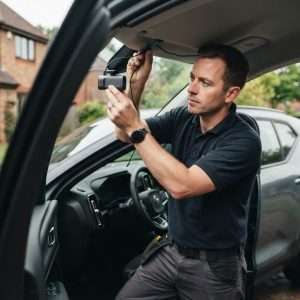
Professional car dash camera fitting gives you a securely mounted camera, concealed wiring and a tested power connection. With mobile fitting, the... Continue reading

Does a gps tracking dash cam let you find your car if it’s stolen? Not by itself. GPS can add location and journey context to... Continue reading

A dash camera can capture a collision clearly and still not tell the whole story. Understanding car dash camera causes of road traffic accidents... Continue reading