
No products in the cart.
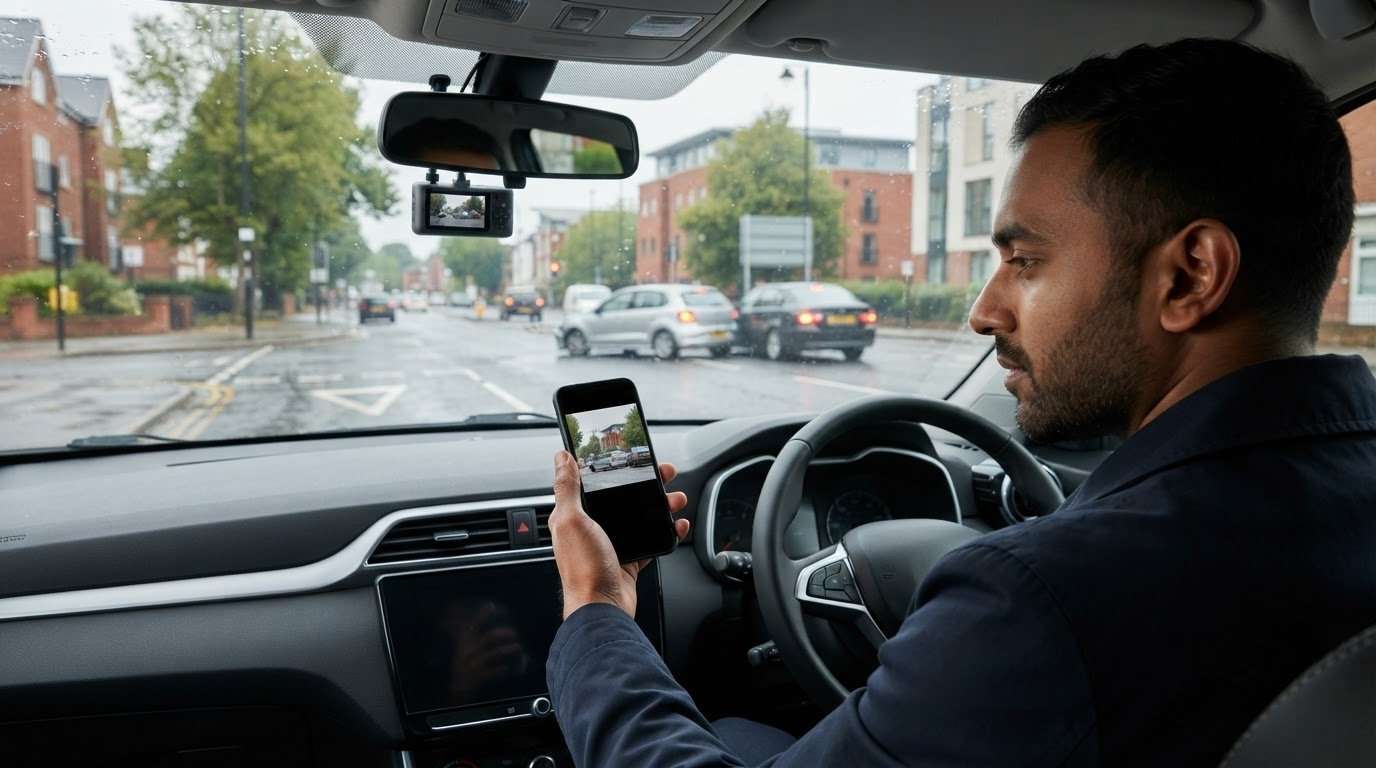
How Car Dash Cameras Help Identify the Causes of Road Traffic Accidents
Dash Cameras
A dash camera can clearly capture a collision but still not tell the whole story. Understanding how car dash-camera footage contributes to road traffic accidents means separating what it shows from what it may suggest. A recording can reveal vehicle positions, visible driver actions, road conditions and the moments leading up to impact.
Conflicting accounts can make it hard to understand how a crash unfolded so that clear footage can seem like a complete explanation. But a camera records events from its own viewpoint. It cannot automatically establish why a collision happened or who was responsible.
This guide explains what dash camera footage can clarify, where it falls short, and how to preserve a useful recording. You’ll learn why the original, unedited clip and its surrounding context matter, and how careful handling can keep relevant footage clear and accessible.
Key Takeaways
- When accounts differ after a collision, consider how driver actions, visibility, road conditions and vehicle movements may all contribute.
- Review the recording in sequence, from the approach to the aftermath, to see how it may help clarify what happened.
- Carefully assess car dash camera footage for causes of road traffic accidents. Camera angle, image quality and missing moments can leave important questions unanswered.
- Make relevant footage easier to find by noting the incident’s date, approximate time and location alongside the clip.
- Consider how camera positioning and professional fitting can support the intended view. Safe & Sound Mobile supplies and fits Thinkware, Hikvision and BlackVue dash cameras.
What causes road traffic accidents, and where can a dash camera help?
After a collision, drivers may remember the same few seconds differently. One account may focus on a sudden lane change, while another describes braking or a hazard appearing ahead. To understand what contributed, look beyond the impact itself. Driver actions, road conditions, visibility, and the movement of nearby vehicles can all shape the picture.
A recording can clarify what happened, but it captures only what the camera sees. It may show a vehicle turning or traffic slowing without revealing what a driver could see or why they acted. That distinction matters when considering dash-camera footage as evidence in road traffic accidents. Footage can inform an assessment, but it does not automatically provide a complete explanation or establish blame.
“Dash camera footage is a record of what the camera captured, not proof on its own of why a collision happened.” Treat it as evidence to interpret alongside other available information, not as a verdict.
Which events may contribute to a road traffic accident?
Start by separating observable actions from possible explanations. A clip may show a vehicle braking, turning, changing lanes or travelling close behind another vehicle. These details can help build a timeline and identify questions for further assessment. They do not necessarily reveal a driver’s full awareness, intention or view of the road.
Context can change how an event appears. Visibility, weather, road layout and surrounding traffic may affect what is visible in a recording and how vehicles move. A bend, junction, obstruction, or busy traffic flow could be relevant. Consider these factors without ranking causes or assigning blame before the available evidence has been assessed.
- Driver actions: Look for visible braking, turning, lane changes and the spacing between vehicles.
- Road and visibility: Note the layout, lighting, weather and anything that may obstruct the camera’s view.
- Traffic movement: Observe how other vehicles move before and during the incident.
What does a car dash camera record?
A dash camera records what its lens sees while the vehicle is moving. The general Dashcam overview describes how these devices are used to document journeys and incidents. The scene in a clip depends on the camera’s position and what is happening around the vehicle.
That view has limits. A vehicle, roadside feature or other obstruction may block part of the scene, while an event outside the recorded area may not appear at all. Even if the collision is visible, the recording may not show every action or circumstance that contributed. Read the clip carefully: identify what is plainly shown, then separate it from what remains uncertain.
How dash camera footage can reveal the sequence before a collision
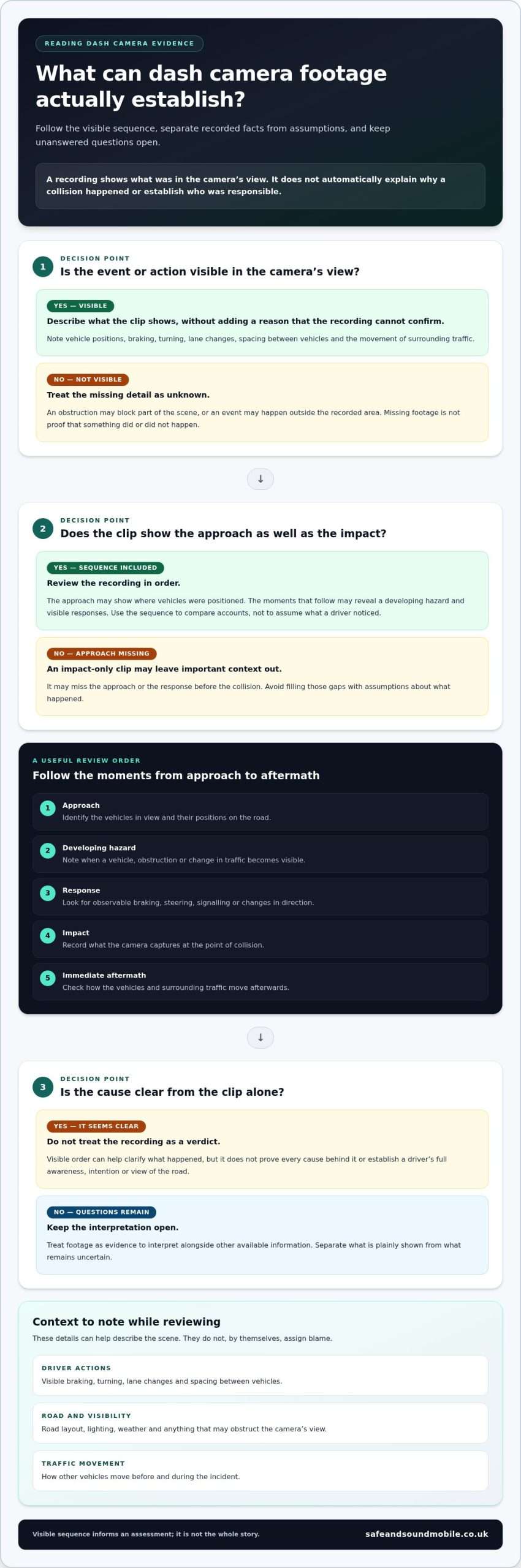
Review a recording in order rather than focusing only on the moment of impact. The approach may show where vehicles were positioned; the following seconds may reveal a developing hazard and how road users responded. This sequence can help compare accounts by anchoring them to visible movement and timing.
A recording can establish the order of visible events without proving every cause behind them. Keep that distinction in mind as you review the clip. A vehicle slowing before another changes lanes is an observable sequence. Why either driver acted, or what they noticed, may remain unclear.
What to look for in the moments before impact
Work through the clip from the approach to the immediate aftermath. Note vehicle positions, direction of travel and any visible change in speed. Signals, braking, hazard lights and movements by cyclists or other road users may also help, if they appear in the recording. Describe what you can see without filling gaps with assumptions about a driver’s decisions.
- Approach: Identify the vehicles in view and their positions on the road.
- Developing hazard: Note when a vehicle, obstruction or change in traffic becomes visible.
- Response: Look for observable braking, steering, signalling or changes in direction.
- Impact: Record what the camera captures at the point of collision.
- Immediate aftermath: Check how the vehicles and surrounding traffic move afterwards.
This sequence gives conflicting accounts a practical point of comparison. For example, the recording may show one vehicle beginning a turn before another enters the frame. That helps establish a visible order, but it doesn’t confirm what either driver could see or whether a particular action caused the collision. When assessing car dash camera causes of road traffic accidents, separate the recorded sequence from your interpretation.
Why surrounding context matters
Look beyond the vehicles closest to the camera. Road layout, nearby traffic and visibility can help explain the scene, while a bend, junction or obstruction may affect what appears in the frame. A forward-facing camera cannot show events outside its view. Treat missing detail as unknown, not as evidence that something did or did not happen.
Keep the full sequence in view where possible. A short clip focused only on impact may miss the approach or response that gives the event context. Note visible landmarks, road markings or changes in traffic flow that help place the clip. These details make it easier to describe what the recording shows without overstating what it proves.
Camera position affects the available view. Safe & Sound Mobile supplies and professionally fits dash cameras, positioned for the intended view. Explore professionally fitted dash cameras.
What dash camera evidence can and cannot establish about accident causes
Dash camera footage can add a useful record to an accident assessment, particularly when accounts differ. Its value depends on what the camera captured and how clearly the relevant events appear. Separate visible details from possible explanations. A recording may show where a vehicle was and how it moved, but it cannot establish everything a driver saw, thought, or intended.
Use this comparison to assess what a clip may contribute to understanding car dash camera causes of road traffic accidents, without treating it as a complete verdict.
| Evidence category | Examples | What it means |
|---|---|---|
| Directly visible facts | A vehicle changes direction, brakes, or enters the camera’s view; traffic slows. | These are events the recording appears to show, subject to image quality and angle. |
| Reasonable questions | Was another vehicle already moving into the lane? Was a hazard visible before the response? | The clip may help identify points to examine, but may not answer them conclusively. |
| Details footage cannot establish alone. | A driver’s awareness, intention, full field of vision, or the collision’s full cause. | These may require context or other evidence beyond the camera’s view. |
Recorded facts versus conclusions about fault
Describe actions before concluding. “The car moved left” describes visible movement; “the driver didn’t check” assumes what the driver saw. The same clip may look different alongside the road layout, surrounding traffic or another account. Dash camera footage can be relevant evidence, but it does not guarantee a particular insurance claim or legal outcome. Avoid presenting an interpretation as a proven finding.
When one camera view leaves unanswered questions
A camera records only what its lens can see. Blind spots, obstructed views, poor lighting, or events beyond the frame can create gaps. The clip’s beginning may show how traffic was developing, while its ending may capture what happened just after impact. Review the available recording carefully instead of relying on an isolated moment that removes useful context.
Image quality also affects what can be assessed. If movement is unclear or an important detail is obscured, do not treat a guess as fact. Note what the clip clearly shows, what remains uncertain and what additional information could help clarify the sequence. This keeps the assessment balanced.
Other material may add context, such as accounts from people involved, photographs of the scene or visible vehicle damage. Consider these alongside the footage rather than expecting one camera view to provide a complete reconstruction. A careful review can make the recording more useful while keeping its limits clear.
What to do with dash cam footage after an accident
After a collision, useful footage can be difficult to find if you are unsure how your camera stores recordings. Act promptly, but don’t change or delete files before securing the relevant material. Keep the steps simple: locate the recording, preserve the original clip and surrounding footage, then share it through an appropriate channel if requested.
- Locate the recording. Check the camera or its storage using your model’s instructions. Note whether the event is saved as a separate file or sits within a longer recording.
- Preserve the clip. Follow the manufacturer’s instructions to save or protect the relevant footage, if available.
- Keep the context. Retain footage from before and after the collision, not just the moment of impact.
- Record the details. Note the incident’s date, approximate time and location using the information available to you.
- Share appropriately. Provide the footage through the relevant police or insurer channel when requested, and follow its instructions.
These steps help keep a recording accessible for later review. When assessing car dash camera causes of road traffic accidents, surrounding footage may place visible events in context. The date, approximate time and location can also help identify the relevant clip.
How to preserve a relevant recording
Use the camera’s instructions rather than guessing how its controls work. Different cameras may handle saved files differently, so check your model’s manual or guidance. Keep the unedited original intact. Where practical, make a separate working copy for viewing or sharing so the source file remains unchanged. Don’t assume every camera stores footage the same way.
How to share footage clearly and responsibly
When providing a clip, explain when and where the incident happened, as far as you know, and briefly describe what the recording appears to show. Keep the description factual. Avoid editing footage in a way that could remove surrounding context or change how the sequence appears. If a recipient asks for a particular format or additional information, follow its instructions.
Consider privacy before sharing recordings that include other road users, passengers or identifying details. This is not legal advice, and requirements can depend on the circumstances. For current UK guidance, consult an appropriate official source before publishing or sharing footage beyond the relevant reporting process.
Safe & Sound Mobile professionally fits dash cameras so they are positioned for their intended view. Explore professionally fitted dash cameras.
Choosing and fitting a car dash camera for clearer road evidence
A dash camera is most useful when its view suits how and where you drive. Start with the area you want recorded, then consider how the camera can be positioned to capture that view without obstructing your sightline. A suitable setup depends on the vehicle and intended coverage, not on an assumption that every model records the same scene.
What to consider when choosing a dash camera
Think about your everyday journeys and which view matters most. A front-facing camera records the scene ahead; a front-and-rear setup adds a view behind the vehicle, but neither arrangement captures everything around the car. Nearby vehicles, road layout, and events outside the lens’s view can still leave gaps. Choose based on the coverage you want, rather than expecting a recording to capture every incident.
Position matters as much as camera choice. Where the unit sits affects what it captures, so consider the vehicle’s layout and the view you want. Poor placement may capture less of the area you want to record. Professional fitting can help align the installation with your vehicle and desired view.
Safe & Sound Mobile supplies and fits dash cameras from Thinkware, Hikvision and BlackVue. The right option depends on your requirements and vehicle. Focus on the recording view you need, and avoid assuming features or accessories are identical across models.
Professional mobile fitting from Safe & Sound Mobile
Safe & Sound Mobile provides professional mobile dash camera fitting across the UK, at your home or workplace. Vehicle-specific advice helps match the installation to your car and the view you want. A tidy, considered fit keeps the camera positioned for its intended purpose, rather than leaving placement to guesswork.
If you are weighing up a camera, first decide whether a front view is sufficient for your needs or whether you would prefer a front-and-rear arrangement. Then consider where the camera should sit in your vehicle. These practical choices help set realistic expectations about what the recording may show, including when reviewing footage to understand the causes of a road traffic accident.
Professional installation doesn’t change a camera’sfield of view, but it ensures the equipment is fitted for its intended purpose. Choose professional dash camera fitting from Safe & Sound Mobile for installation at home or work.
Choose a setup that supports your next journey
Understanding the causes of road traffic accidents starts with choosing a camera for the view you want and positioning it to capture that view. A recording can support a clearer account of events, but it cannot replace careful judgement or guarantee a particular outcome. Treat it as one practical part of being prepared on the road.
Good installation matters too. Customer reviews praise Safe and Sound Mobile’s professional, tidy installations. Choose a setup that suits your vehicle and driving needs, and take a practical step towards recording the road ahead.
Explore dash cameras and professional mobile fitting from Safe and Sound Mobile. Safe and Sound Mobile provides nationwide mobile installation at home or work.
Frequently Asked Questions
Can a dash camera show what caused a road traffic accident?
A dash camera can show recorded events that may help explain how a collision unfolded, but it cannot capture every contributing factor. Assessing car dash camera causes of road traffic accidents means distinguishing visible actions from missing context. For example, a clip might show a vehicle changing lanes but not what its driver could see. Use the recording to identify details and questions for review, rather than treating it as a complete account.
Can dash camera footage prove who was at fault?
Dash camera footage may show actions relevant to a review, but it does not automatically prove fault. A clip might show one vehicle entering a junction, but it may not show what the other driver could see or what happened outside the frame. The full circumstances matter. Keep your description of the recording factual, and avoid assuming that a particular image will determine an insurance claim or legal outcome.
What should I do if my dash camera records an accident?
Use your camera’s instructions to save the relevant recording, then keep surrounding footage where possible. Note the incident’s approximate time and location, and preserve the original file without altering it. If you need to send footage, follow the instructions of the police or insurer receiving it. Before sharing identifiable footage more widely, consult current UK guidance and consider whether other people can be recognised in the recording.
Can an insurer use dash camera footage?
Yes, footage may be relevant when an insurer reviews an incident, particularly if accounts differ. Its usefulness depends on the clip’s clarity, what it captures, and the wider information available. A recording may help show the order in which vehicles moved, while still leaving questions about visibility or events outside the frame. Provide the original footage and any requested context, but do not assume it guarantees a particular decision.
Can a dash camera record every cause of a collision?
No. A dash camera records only what its lens can capture. It may not show a vehicle approaching from behind, an event outside the frame or activity before the recording begins. Glare, low light or an obstruction can also make details difficult to interpret. If a clip appears to miss part of the scene, treat that information as unknown rather than assuming what happened.
Does a dash camera prevent road traffic accidents?
No. A dash camera records a journey; it does not prevent collisions or replace attentive driving. Footage might later help someone review a journey, such as identifying where traffic began to slow, but that does not guarantee a safety outcome. Keep your attention on driving and treat the camera as a recording device, not a substitute for careful decisions on the road.
Who can fit a dash camera at my home or workplace?
Safe and Sound Mobile offers professional mobile dash camera installation at home or work across the UK. Its range includes Thinkware, Hikvision, and BlackVue cameras, with vehicle-specific advice to suit your car and intended view. Professional fitting can help position a camera appropriately, but no recording can capture every event. Choose a setup based on what you want to record.

About author
Related posts
A dash cam’s recording time depends on its memory card and video quality. For a single-camera setup, a 32GB card stores around 2 to 4... Continue reading
A dash cam can keep recording when your car is off, but only if it has a suitable power source and parking mode. A hardwired... Continue reading
Does a gps tracking dash cam let you find your car if it’s stolen? Not by itself. GPS can add location and journey context to... Continue reading
Could choosing the wrong tracker category leave your insurer’s requirement unmet? The right thatcham approved tracker installation uk starts with the... Continue reading
The right car tracking system isn’t necessarily the one with the longest feature list. It’s the one that suits your vehicle, your insurer’s... Continue reading