
No products in the cart.
Does a Dash Cam Work When Your Car Is Off? Parked Recording Explained
Parked Recording Explained
A dash cam can keep recording when your car is off, but only if it has a suitable power source and parking mode. A hardwired dash cam typically records while parked for hours to a couple of days, depending on its setup and whether it records continuously or wakes when it detects movement or an impact. If you’re asking whether a dash cam will work when our car is off, the key is how it gets power.
It’s easy to assume a dash cam will carry on recording after you remove the key, but a model powered through the car’s 12V socket usually stops when that socket switches off. Parked footage can help show what happened if the vehicle is damaged, though it depends on the camera capturing the incident.
This guide explains how parking mode works, what affects recording time and when an external battery pack may be worth considering. You’ll also learn how hardwiring and power limits affect your car battery, so you can choose a setup that suits where you park and the protection you want.
Key Takeaways
- Parked recording depends on the camera’s parking mode, trigger settings and power supply, so check how your setup responds to motion or impact.
- Compare hardwiring with an external battery pack to understand how each option affects recording time and power use.
- A dash cam using a 12V socket may stop when the ignition is off; the socket’s power behaviour determines whether it keeps running.
- Time-lapse mode can capture activity while using less power and storage than continuous recording.
- Choose a recording setup that balances parking coverage with battery protection and keeps useful footage available.
How Long Can a Dash Cam Record When Parked?
A hardwired dash cam typically records while parked for hours to a couple of days. Parking mode can extend useful coverage by letting the camera sleep between detected events instead of recording continuously.
Motion-Triggered Parking Recording
Motion-triggered parking recording uses sensors to detect movement near a parked car and start recording. This can capture activity around the vehicle without keeping the camera recording continuously. For example, if someone walks close to the car, a sleeping dash cam may wake and save footage of the movement.
Impact-Triggered Recording
Impact-triggered recording uses a built-in G-sensor to detect a sudden change in the car’s motion, such as a bump. The dash cam can then save an incident clip, helping preserve footage if another vehicle hits your car while it’s parked. This triggers if no one sees an event, even when nobody is nearby to notice it.
Recording time depends on the parking mode and power setup. A hardwired dash cam can typically run for hours to a couple of days while parked, but that runtime isn’t fixed for every camera. Continuous recording uses power throughout the parking period. Motion- or impact-triggered recording works differently: the camera can sleep whenthere’ss no activity, then wake when its sensors detect an event.
That difference matters in a car park. A camera recording continuously captures a longer, uninterrupted view, while a camera in sleep mode records when a sensor detects movement or impact. If a person walks past without touching the car, motion detection may trigger a clip. If a vehicle bumps the parked car, the G-sensor may trigger incident recording.
Motion detection and impact detection respond to different events. Motion sensors detect movement around the car; a G-sensor detects sudden changes in the vehicle’s movement. A dash cam may use one trigger or both, depending on its parking mode. This distinction helps explain why footage may start after an event rather than showing every moment the car is parked.
Incident recording can preserve footage from before, during and immediately after a trigger. Earlier footage may show what happened just before an impact, while later footage can show what followed. When the memory card fills, loop recording usually overwrites older footage. Incident clips may be protected from being overwritten by continuous recording loops.
To estimate recording time, consider whether your dash cam records continuously or waits for a sensor trigger, then account for its available power. How long it can record depends on both its recording mode and power source. A hardwired setup commonly provides parked recording for hours to a couple of days, while event-triggered parking mode records only when its sensors detect activity.
Do I Need an External Battery Pack?
An external battery pack helps when you want parked recording without draining the car battery. Leaving a dash cam powered can drain the vehicle battery, and a permanently live 12V socket may eventually flatten it.
Battery Drain and Safety Cut-Offs
A hardwiring kit’s voltage cut-off stops the dash cam drawing power once the car battery reaches a preset level. This matters because the system is designed to leave enough charge to start the engine. Some cut-off controllers use a threshold such as 12.2 volts. Dash cams can draw 0.5 to 2.0 amps, depending on features such as parking mode and video resolution.
Power use adds up while the vehicle is parked. Parking-mode recording may be triggered by movement or an impact instead of running continuously. A voltage cut-off reduces the risk of excessive battery drain, but it also stops recording when it’s reached. If the vehicle sits unused, the camera’s power demand and the battery’s available charge affect how long parking coverage lasts.
Hardwiring and External Battery Packs
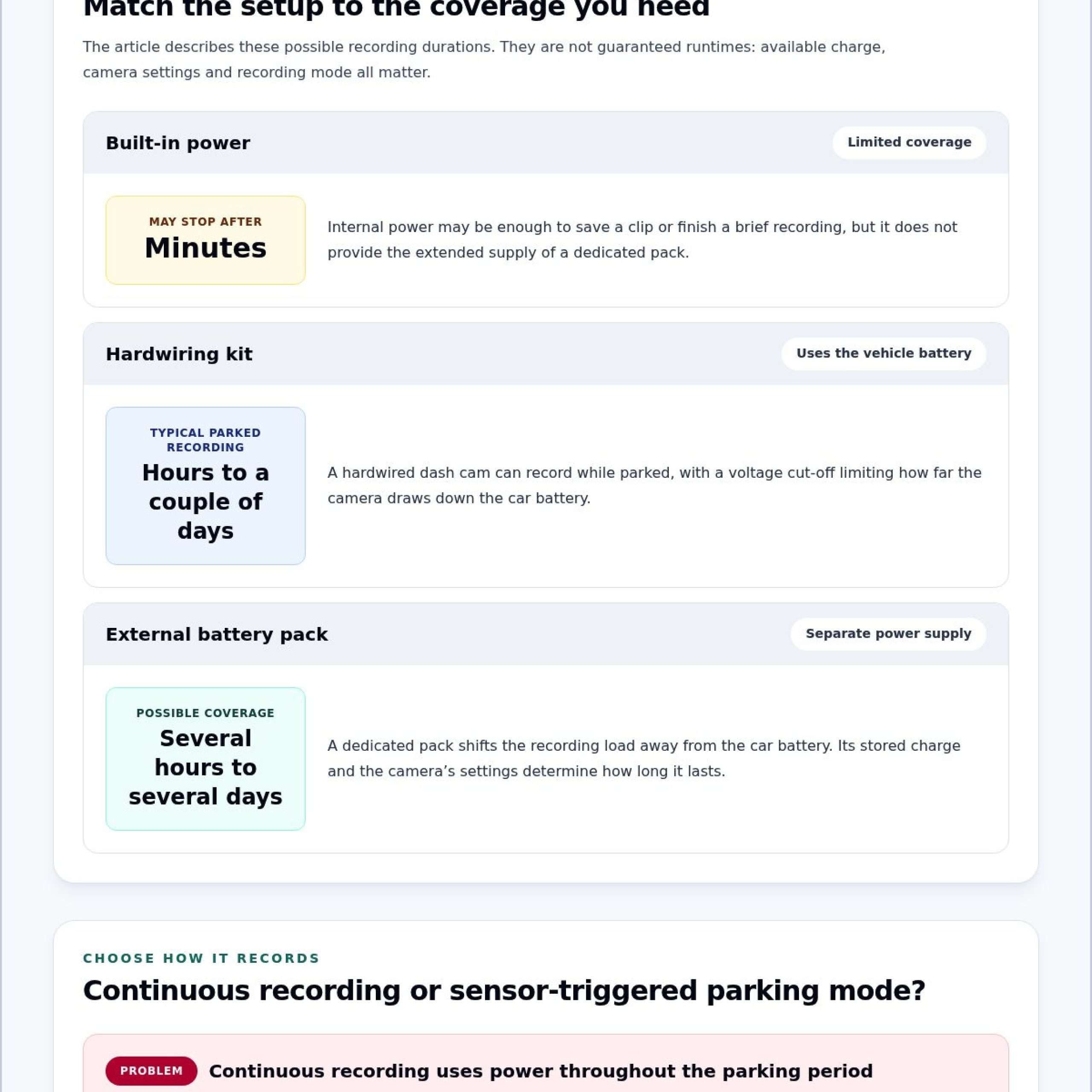
A hardwiring kit connects the dash cam to the vehicle’s electrical system, while an external battery pack powers the camera separately. Either can support parking mode after the engine is switched off. A dedicated pack can power recording for several hours, and some external dash cam battery packs can provide coverage for up to several days.
The choice depends on how long you want parked surveillance and how much you want to draw from the car battery. Hardwiring uses the vehicle battery until its voltage cut-off operates. A separate pack shifts the recording load to that pack, though its stored charge limits recording time. Capacity and the camera’s recording settings determine how long the supply lasts.
Built-In Batteries and Capacitors
Built-in power may offer only limited parked recording, so longer coverage typically requires another power source. It may provide enough power to save a clip or complete a brief recording, but it won’t provide the extended supply of a dedicated battery pack. This distinction matters if you expect surveillance to continue for longer after parking.
For example, a camera relying only on its internal power source may stop after minutes. Meanwhile, a dedicated external pack can run for several hours or, in some cases, several days. A hardwired setup instead draws from the car battery and uses its voltage cut-off. Match the power method to the coverage length you need and the impact you’re willing to have on the vehicle battery.
Parking footage records events; it doesn’t physically prevent vehicle theft. For an extra layer of protection, consider a vehicle immobiliser alongside your dash cam setup.
Whether dashcams record with the ignition off
Some dash cams can record with the ignition off, but they need a power source and a suitable recording feature. In a parked car, the setup determines whether it records continuously or only for selected events.
Recording With the Ignition Off
A dash cam can keep recording after the engine stops if it receives power and supports parking recording. A camera connected to a 12V socket usually stops when the ignition switches off that socket. A hardwired camera can draw power while parked, while some electric vehicles use factory camera systems powered by thevehicle’ss larger battery.
The ignition position alone doesn’t determine whether recording continues. For example, a camera plugged into a switched socket may stop as soon as you leave the car. A camera with a suitable parking-power setup can keep recording or wait for an event. This matters in a public car park, where an incident may happen after the driver has left.
Continuous and Loop Recording
Continuous recording captures footage for as long as the camera has power, while loop recording manages files when the memory card fills. With loop recording, the dash cam overwrites older or less important footage with new recordings. This lets the camera keep capturing without requiring the driver to clear the card after every journey.
Loop recording doesn’t mean every clip remains available indefinitely. If a useful recording isn’t protected, newer footage may replace it as the card fills. Incident recording can preserve footage from before, during and immediately after an event, protecting it from being overwritten by continuous loops. For example, a saved impact clip can remain available while ordinary driving footage cycles off the card.
Recording Duration and Storage Capacity
Storage capacity affects how much footage a dash cam can store before loop recording overwrites older files; for 24/7 recording or high-resolution video, 128GB or more is typically recommended. Higher-resolution footage uses storage faster, so the camera may overwrite older recordings sooner than a lower-resolution setup.
The recording period also depends on the power supply and recording mode. A powered camera recording continuously fills its card differently from one that records only after a trigger. Consider both factors together: available power determines how long the camera can run, while card capacity affects how much footage it can retain.
For UK use on public roads or in car parks, keep recordings focused on vehicle security and relevant incidents. Handle footage showing identifiable people or number plates carefully, and consider privacy before sharing it publicly. For example, retain a clip of a collision for the incident rather than posting it online.
What Is Parking Mode and How Does It Work?
Parking mode changes how a dash cam records after you leave the vehicle. Depending on its setting, it can record time-lapse footage or wait for a trigger.
Time-Lapse Parking Recording
Time-lapse parking recording captures images at set intervals instead of continuously recording full-speed video. Some dash cams use 5 frames per second to reduce power and memory card use. Other examples include 2x and 4x time-lapse recording speeds. This approach can show activity across a longer parked period while using less storage than continuous video.
The trade-off is detail. A time-lapse clip shows a sequence of events, but contains fewer frames than standard video. If a car park incident happens between captured frames, the recording may miss movement. For example, time-lapse can show a vehicle arriving and later leaving, while a continuous clip can show more of the action in between.
Storage matters too. Time-lapse uses less space than continuous recording, so the memory card can store more footage before loop recording overwrites older files. How much footage it retains still depends on the camera’s resolution, recording settings and card capacity. Choose time-lapse for broad coverage while parked, and event-based recording when specific movement or impact matters most.
Parking Mode and Sleep Mode
Sleep mode lets a dash cam pause active recording while parked, then wake when its sensors detect motion or an impact. This reduces recording when nothing is happening. It matters for hardwired cameras that need to limit power use, since constant recording can drain the vehicle battery.
After waking, the dash cam records the detected event rather than every quiet moment beforehand. For example, a camera can remain asleep while a car is stationary, then start recording when someone moves close, or the vehicle experiences a sudden impact. The parking mode setting determines whether the camera uses sleep, time-lapse or another available recording approach.
Parking Mode Use Cases
Parking mode is designed for when the driver leaves the vehicle, such as overnight at home or during a visit to a car park. A hardwired dash cam can use this feature while the ignition is off, depending on its power setup and recording mode. This gives drivers a record of activity around a parked vehicle.
For example, footage may help show the sequence of events after a car park collision and support an insurance discussion. Time-lapse can cover longer parking periods with less storage, while motion or impact triggers focus on detected events. Select a mode based on where the vehicle is parked, what activity you want to capture, and the balance between coverage and power consumption.
Benefits for security and insurance claims
Parked footage can provide a visual account of an incident when nobody is inside the vehicle. For example, a camera might capture another car moving into a parking space, contacting your vehicle and leaving. That sequence can help explain what happened, rather than relying only on damage discovered later. A dash cam records events; itdoesn’tt physically prevent theft or damage.
Motion-triggered recording can show activity around a parked car, while an impact trigger can capture a sudden change in movement. Together, these features can give you a clearer record of incidents such as a car park collision or someone approaching the vehicle. The camera must be powered on and set to parking mode for those clips to record.
For an insurance discussion, clear footage can help establish the time and sequence of an event. A clip showing a vehicle arriving, making contact and driving away provides more context than a photograph of a dent alone. It can also show visible damage alongside the moments captured on camera. Footage is useful, but it doesn’t determine responsibility or guarantee a specific claim outcome.
Preserve the relevant recording promptly. Note the date, location and approximate time, then keep the original clip intact. If the dash cam uses loop recording, continued use can eventually overwrite ordinary footage. The camera’s incident file is less likely to be replaced by routine recordings, but keeping a separate copy helps preserve the clip for later reference.
Review the recording for context before sharing it. Check that it shows the full sequence, including movement before and after contact, not just the moment of impact. A brief clip might miss how a vehicle entered the space; a longer clip can make the timeline easier to understand. Keep unrelated footage private, especially if it shows other people or number plates.
Parking coverage also depends on the power setup. A hardwired camera can draw from the car battery, so voltage cut-off protection matters: it limits how much the dash cam can drain the battery. A separate vehicle security measure addresses a different risk: the lack of recorded evidence. To explore insurance-approved vehicle trackers, consider how tracking can complement a camera’s incident record.
Safe & Sound Mobile: Insurance Approved Vehicle Trackers
Safe & Sound Mobile offers Dash Cams and Insurance Approved Vehicle Trackers for drivers planning their vehicle security. A dash cam can document activity around a parked car, while a tracker provides an additional layer of security. Safe & Sound Mobile also offers Vehicle Immobilisers for drivers looking to add another layer of vehicle protection. Its mobile installation service brings fitting to your location, making professionally installed security equipment a practical next step.
If you’re choosing between recorded evidence and additional vehicle security, consider which gap you want to address. Contact Safe & Sound Mobile to discuss dash cam supply or mobile installation, or visit safeandsoundmobile.co.uk.
Choose the Right Setup for Your Parking Routine
Before deciding how to protect your vehicle, think about where it spends time parked and what you want recorded. A car left on a busy street faces different surroundings from one kept on a private drive. Your preferred balance of coverage, power use, and saved footage can guide your dash cam setup.
Understanding whether a dash cam works when your car is off is only part of the decision. Consider what you need the camera to capture, how long it shouldstayn active, andhow you’lll preserve useful footage if an incident occurs. A suitable setup should fit your routine, rather than simply keeping the camera running without a clear purpose.
If you’re weighing your vehicle security options, Safe & Sound Mobile can help you decide your next step. Contact Safe & Sound Mobile for advice and move forward with a setup that suits your needs.
Frequently Asked Questions
Can a Dash Cam Work When The Car Is Off?
Yes, if the camera has a power source that remains available after you switch off the car. For example, a dash cam connected to a socket that loses power when you turn off the ignition will stop, while a hardwired camera can keep running off the vehicle battery. A suitable external battery pack is another option. The camera also needs a recording mode designed for parked use.
Do Dashcams Record When the Car is Off?
Some dash cams do, but not simply because they’re plugged in. The deciding detail is whether the camera still receives power after the ignition is off. If you park at work for several hours, a switched-off socket won’t support ongoing recording. A separate power source can keep the camera running, depending on its recording mode and remaining charge.
Dashcam battery drain explained: What happens when your car is off?
A powered dash cam draws energy while the vehicle is stationary, reducing the car battery’s available charge. The amount depends on its settings: a camera recording continuously uses power differently from one that sleeps between events. For instance, a permanently live socket can keep a camera powered after parking. A hardwiring kit’s voltage cut-off is designed to stop power draw before the battery is depleted too far.
Do dash cams record when the car is switched off?
They can, provided the camera keeps receiving power and has a parked-recording feature. Switching off the engine doesn’t automatically shut down every camera, because some vehicles have a permanently live 12V socket. In another car, that socket may switch off with the ignition. The same dash cam could therefore behave differently depending on the vehicle’s power connection and the camera’s settings.
How does parking mode work on a dash cam?
Parking mode changes how a dash cam records while the car is stationary. Depending on its settings, it may record time-lapse footage or wait for movement or impact before starting a clip. For example, if you leave the car in a busy multi-storey car park, event-triggered recording can focus on detected activity rather than capturing every quiet moment. The camera still needs power while parked.
What power supply does a dash cam need when the engine is off?
A dash cam needs a source that continues supplying power after the ignition is off. Common arrangements include a hardwiring kit connected to the vehicle’s fuse box or a dedicated external battery pack. A 12V auxiliary socket works only if it remains live while parked. Check how your chosen connection behaves with the engine off, since a switched socket can stop the camera recording.
Can a dash cam drain a car battery in parking mode?
Yes. A dash cam drawing power from the vehicle battery can reduce its charge, particularly if it records continuously or the car remains parked for an extended period. A hardwiring kit with a voltage cut-off limits that draw by switching off the camera at a preset threshold. An external battery pack provides a separate power source, so parked recording doesn’t rely solely on the car battery.
How long can a dash cam record while parked?
A hardwired dash cam typically records for hours to a couple of days while parked. Actual running time depends on the power source, recording settings and whether the camera records continuously or activates after a detected event. A dedicated external battery pack can provide several hours of recording, with some packs supporting up to several days. The camera’s power use and available charge determine how long it can run.
About author
Related posts
A dash cam’s recording time depends on its memory card and video quality. For a single-camera setup, a 32GB card stores around 2 to 4... Continue reading
The right car tracking system isn’t necessarily the one with the longest feature list. It’s the one that suits your vehicle, your insurer’s... Continue reading
A dash camera can capture a collision clearly and still not tell the whole story. Understanding car dash camera causes of road traffic accidents... Continue reading
Searching for car camera fitting near me doesn’t have to mean driving to a workshop. Safe & Sound Mobile provides professional dash camera... Continue reading
A front-facing dash cam can miss an incident behind your vehicle. A car dash cam with rear camera records a second view, adding context that... Continue reading