
No products in the cart.
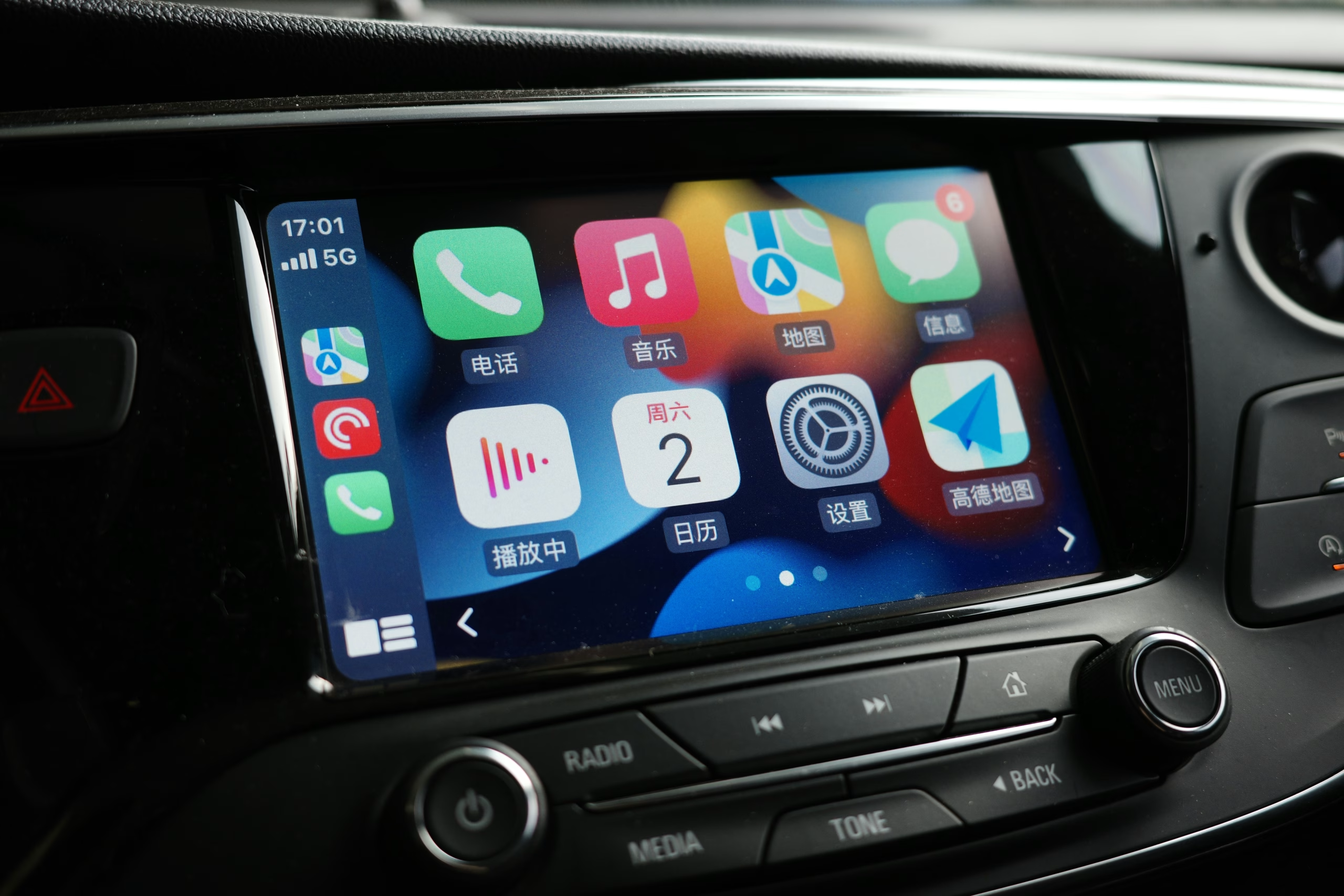
IT3-CIC CarPlay and Android Auto Solution for BMW, Mini, Rolls-Royce
Features, Compatibility, and Installation
If you own a BMW, Mini, or Rolls-Royce from 2009 to 2016, you likely have a factory infotainment system that feels outdated compared to modern smartphones. The CIC system in these vehicles lacks wireless CarPlay and Android Auto, which means you can’t easily use apps like Spotify, Google Maps, or WhatsApp through your factory screen. This leaves you stuck with older navigation and limited connectivity. With the IT3-CIC CarPlay and Android solution, you can enhance your driving experience.

The IT3-CIC solution adds wireless CarPlay and Android Auto to your factory BMW, Mini, or Rolls-Royce system without replacing the original screen or controls. You keep your OEM look whilst gaining access to modern apps, voice control, and smartphone features. The system also supports front- and rear-facing cameras, USB playback, and smartphone mirroring for apps not supported by CarPlay or Android Auto. Experience the benefits of IT3-CIC CarPlay and Android integration.
Installation is plug-and-play, meaning the kit connects to your existing hardware without cutting wires or making major modifications. You use your factory iDrive controller and buttons to operate everything, so the experience feels natural and integrated. The kit includes a three-year warranty and works wirelessly with both iPhone and Android devices.
Key Takeaways
With the IT3-CIC CarPlay and Android solution, you can enjoy seamless integration and modern connectivity in your vehicle.
- The IT3-CIC adds wireless CarPlay and Android Auto to select BMW, Mini, and Rolls-Royce models from 2009 to 2016 with CIC systems.
- The system integrates with your factory screen and iDrive controls, whilst adding camera inputs, USB playback, and smartphone mirroring.g
- Installation is plug-and-play with no wire cutting required, and the kit includes a three-year warranty.
Key Features of the IT3-CIC CarPlay and Android Auto Solution
The IT3-CIC brings wireless connectivity, expanded media options, and seamless smartphone integration to your BMW, Mini, or Rolls-Royce. These features work through your existing factory controls and display, maintaining the original look whilst adding modern functionality.
Wireless CarPlay and Wireless Android Auto
The IT3-CIC supports wireless CarPlay and wireless Android Auto, eliminating the need for cables in your vehicle. Your iPhone or Android phone connects automatically when you start your car, so you can access navigation, music, and messaging without plugging anything in.
Wireless CarPlay displays apps like Apple Maps, iMessage, and Spotify directly on your factory screen. You control everything through the existing iDrive system and steering wheel buttons. Voice commands through Siri let you make calls, send messages, and adjust navigation whilst keeping your hands on the wheel.
Wireless Android Auto works the same way for Android users. Google Maps, Waze, and your messaging apps appear on the OEM display in a driver-focused layout. Google Assistant handles voice control for navigation, calls, and music playback. The wireless connection keeps your cabin tidy and makes daily use more convenient.
Smartphone Mirroring Capabilities
Beyond CarPlay and Android Auto, the IT3-CIC offers smartphone mirroring to your factory display. This feature lets you show apps that aren’t officially supported by Apple or Google’s platforms.
Mirroring proves useful for track-day apps, specialised navigation tools, or web content you need whilst parked. You can display nearly any app from your phone on the larger factory screen. The feature works with both iPhone and Android devices, giving you flexibility when standard CarPlay or Android Auto doesn’t support what you need.
USB A/V Playback Support
The IT3-CIC includes USB A/V playback, allowing you to play video and audio files directly from a USB drive. You can watch videos when parked or listen to audio files through your factory sound system.
This feature is separate from the smartphone connectivity options. Yoy plug a USB drive into the interface, and your media files become accessible through the factory controls. It adds another entertainment option without requiring your phone or an active connection.
Vehicle Compatibility and Supported Models

The IT3-CIC works with BMW, Mini, and Rolls-Royce vehicles equipped with the CIC infotainment system. This covers specific model years from 2009 to 2016, depending on your vehicle type.
BMW CIC Infotainment System Vehicles
Your BMW needs the CIC infotainment system for the IT3-CIC to work properly. The system fits the following models:
1 Series (2009–2015) – E81, E82, E87, and E88 body styles all support the interface when equipped with CIC.
3 Series (2009–2012) – E90, E91, E92, and E93 variants work with both the 6.5″ and 8.8″ displays.
5 Series (2009–2013) – the upgrade supports E60 and E61 models from this period.
The larger models include the 6 Series (2009–2013), 7 Series (2009–2012), X5 (2009–2013), and X6 (2009–2014). The smaller crossovers covered are the X1 (2013–2015) and X3 (2011–2013). The Z4 (2009–2016) roadster also accepts the IT3-CIC module.
All of these BMW models must have the factory CIC head unit installed. Earlier or later infotainment generations will not work with this specific kit.
Mini and Rolls-Royce Model Coverage
Mini vehicles from 2009 to 2016 with the CIC infotainment system support the IT3-CIC. This includes the Cooper (2009–2016), Countryman (2009–2014), Clubman (2009–2014), and Paceman (2009–2014).
Mini models with the EVO system require either a 6.5″ or 8.8″ touchscreen display. Smaller screens on EVO units are not compatible with the interface.
The Rolls-Royce Ghost (2010–2014) also supports the IT3-CIC when fitted with the CIC infotainment system. Your Ghost must fall within this model year range for proper integration with the factory screen and iDrive controller.
Camera and Audio/Visual Interface Integration

The IT3-CIC system adds front- and rear-camera capabilities to your BMW’s factory display, along with USB audio and video playback. These features work through your existing iDrive controls without requiring a new screen.
Front View Camera Input
The IT3-CIC includes a dedicated front-view camera input that connects directly to your factory infotainment system. This input allows you to install an aftermarket front camera that displays on your CIC screen. You can access the front camera view through your iDrive controller whenever you need to check tight spaces or obstacles ahead of your vehicle.
The front camera integrates seamlessly with your existing display. It uses the same screen quality and resolution as your factory system. The camera feed appears clear and responsive, making it easier to navigate car parks, tight driveways, or urban streets where visibility matters most.
Rear View Camera Integration and Dynamic Parking Lines
The rear-view camera input works similarly to the front camera but includes dynamic parking lines that adjust based on your steering wheel position. These lines move as you turn the wheel, showing you your vehicle’s projected path. This makes reversing into parking spaces or tight spots more precise.
The dynamic parking lines update in real-time as you steer. They help you judge distances and angles whilst reversing. The rear camera activates automatically when you shift into reverse, just like a factory-installed system would. The camera feed displays on your CIC screen with the same quality and clarity you expect from your BMW’s original equipment.
Both camera inputs support standard aftermarket cameras. You don’t need special proprietary equipment to use these features.
Installation, User Experience, and Warranty Information
The IT3-CIC system combines straightforward installation with practical features for daily use. The plug-and-play design requires no complex coding, whilst the interface integrates seamlessly with your existing iDrive controls.
Plug and Play Installation Method
The IT3-CIC uses a plug-and-play installation approach that doesn’t require vehicle coding or modifications to your BMW’s software. You’ll connect several cables, including the LVDS cable for video, the WiFi antenna for wireless connectivity, and the iDrive cable to maintain your factory controls.
The installation process involves connecting these cables to your CIC head unit. You’ll attach the audio cable to the AUX-IN port on your armrest box and position the WiFi antenna to receive a clear signal. The LVDS connection ensures your display shows maps and videos properly.
Most installations take between one and two hours. You can complete the work yourself if you’re comfortable removing interior panels, or you can have a professional installer handle it. The system preserves all your original BMW features whilst adding wireless CarPlay and Android Auto capabilities.
User Controls, Apps and Interface
Your existing iDrive knob and steering wheel controls work directly with the ZZPLAY system. You can navigate through menus, adjust volume, and select apps using the same controls you already know.
The system supports popular apps, including:
- Apple Maps and Google Maps for navigation
- Spotify, Apple Music, and other streaming services
- WhatsApp and iMessage for messaging
- Phone calls through your car’s speakers
You access CarPlay or Android Auto by selecting the AUX input on your iDrive menu. The interface appears on your factory screen with full resolution. Voice commands work through Siri or Google Assistant when you press the microphone button on your steering wheel.
Warranty and Support Details
The IT3-CIC typically comes with a 3-year warranty covering manufacturing defects and component failures. This warranty protects the main unit, cables, and included accessories against defects in materials and workmanship.
Support options vary by retailer but generally include installation guides, troubleshooting resources, and technical assistance. Many suppliers provide compatibility-checking tools that use your VIN before purchase. If you encounter issues during setup or use, most retailers offer email or phone support to resolve connection problems, audio issues, or configuration questions.
Frequently Asked Questions
The IT3-CIC system works with specific BMW, MINI and Rolls-Royce models from 2009 to 2016 that have the CIC infotainment platform. Installation is designed to be straightforward whilst preserving your factory controls and audio quality.
Is this retrofit compatible with my BMW, MINI or Rolls-Royce model and build year?
The IT3-CIC interface is designed for vehicles equipped with the CIC infotainment system. This system was fitted to select BMW, MINI and Rolls-Royce models manufactured between 2009 and 2016.
You need to verify that your vehicle has the CIC platform before purchasing. The CIC system was the second-generation iDrive and can be identified by its specific screen size and menu layout. Not all vehicles from these years have CIC, as some earlier models used CCC, whilst later ones moved to NBT.
Does the system support both wired and wireless Apple CarPlay and Android Auto?
The IT3-CIC solution provides wireless connectivity for both Apple CarPlay and Android Auto. You don’t need to connect your phone to a cable to access these features.
Your phone connects via Bluetooth and WiFi once tWiWiWiFial pairing is complete. This allows you to keep your phone in your pocket or bag whilst using navigation, music and messaging apps through the factory screen.
Will the installation retain the original iDrive/infotainment features and steering wheel controls?
Your factory iDrive system remains fully functional after installation. The IT3-CIC adds CarPlay and Android Auto as additional options rather than replacing your existing features.
You can still access your original radio, CD player, Bluetooth and other BMW functions. Your steering wheel controls continue to work as designed, allowing you to control volume, track selection and phone calls. The system integrates with your vehicle’s existing controls rather than requiring new buttons or interfaces.
How is audio routed to the factory sound system, and will call and media quality be affected?
Audio from CarPlay and Android Auto is routed through your factory sound system using the existing connections. The IT3-CIC interface integrates with your BMW’s audio setup without requiring speaker modifications.
Call quality uses your vehicle’s factory microphone system. Media playback quality matches what you’d expect from your standard Bluetooth or auxiliary audio connections. The system processes audio digitally to maintain clarity through your factory speakers or upgraded sound system.
Can I use the original OEM microphone and reversing camera, or are additional parts required?
The IT3-CIC interface is designed to work with your factory-fitted microphone. Your existing OEM microphone handles phone calls made through CarPlay or Android Auto without requiring replacement.
The system includes inputs from front- and rear-view cameras. If your vehicle already has a reversing camera, it will continue to function normally. You can also add cameras if your vehicle didn’t originally have them, as the interface provides the necessary connections.
What is the typical installation time, and does fitting require coding or cutting any factory wiring?
Installation is a plug-and-play process that typically takes one to two hours. The interface connects to your existing wiring harnesses without requiring you to cut or splice factory cables.
You don’t need special coding or programming software to activate the system. The connections are designed to match BMW’s factory connectors, enabling seamless integration. Professional installation is recommended if you’re not comfortable working with vehicle electronics, though experienced DIY installers can complete the process themselves.


About author
Related posts

Keeping your factory stereo doesn’t mean missing out on an upgraded sound system. A line output converter changes the stereo’s speaker-level signal... Continue reading
Will a Powerbass loaded enclosure fit your car and work with the stereo and amplifier you already have? A box can look right but take... Continue reading

Could an audio upgrade affect your car’s electrics or leave its interior looking untidy? It’s a fair concern when choosing car amplifier installation... Continue reading

Chasing massive peak wattage figures is the easiest way to end up with muddy, distorted sound. Clean, impactful bass actually depends on enclosure... Continue reading

Why settle for a flat, lifeless commute when your vehicle could feel like the front row of a concert? Most UK drivers tolerate tinny factory... Continue reading