
No products in the cart.
GPS Auto Track: How GPS Vehicle Tracking Works in the UK
How GPS Vehicle Tracking Works in the UK
A GPS tracker can help locate a stolen car, but it won’t necessarily stop the theft. That distinction matters when you’re considering GPS AUTO TRACK for your vehicle. A tracker provides location information, while an immobiliser is designed to prevent the vehicle from starting without the correct authorisation.
Before choosing vehicle security, it helps to know what each device can and can’t do. A tracker isn’t a substitute for every other security measure, and your insurer may specify the type of device required. This guide explains how vehicle tracking works, what to consider when comparing systems and how trackers differ from immobilisers.
You’ll also find practical steps for choosing and arranging a professionally fitted tracker, including checking your policy wording for insurance requirements. Safe & Sound Mobile supplies and installs insurance-approved Thatcham S5 and S7 trackers, with mobile fitting across the UK. Use the guidance below to match your needs with the right security equipment.
Key Takeaways
- GPS AUTO TRACK can refer to vehicle-location technology, an app or a service name, so check what a particular option actually provides.
- Understand the basic process, from fitting a tracker to viewing location information.
- Compare a tracker’s role in locating a vehicle with an immobiliser’s role in restricting it from starting.
- Match the tracker’s stated features to your needs, check your insurer’s wording and consider professional fitting.
What does GPS Auto Track mean for a UK vehicle owner?
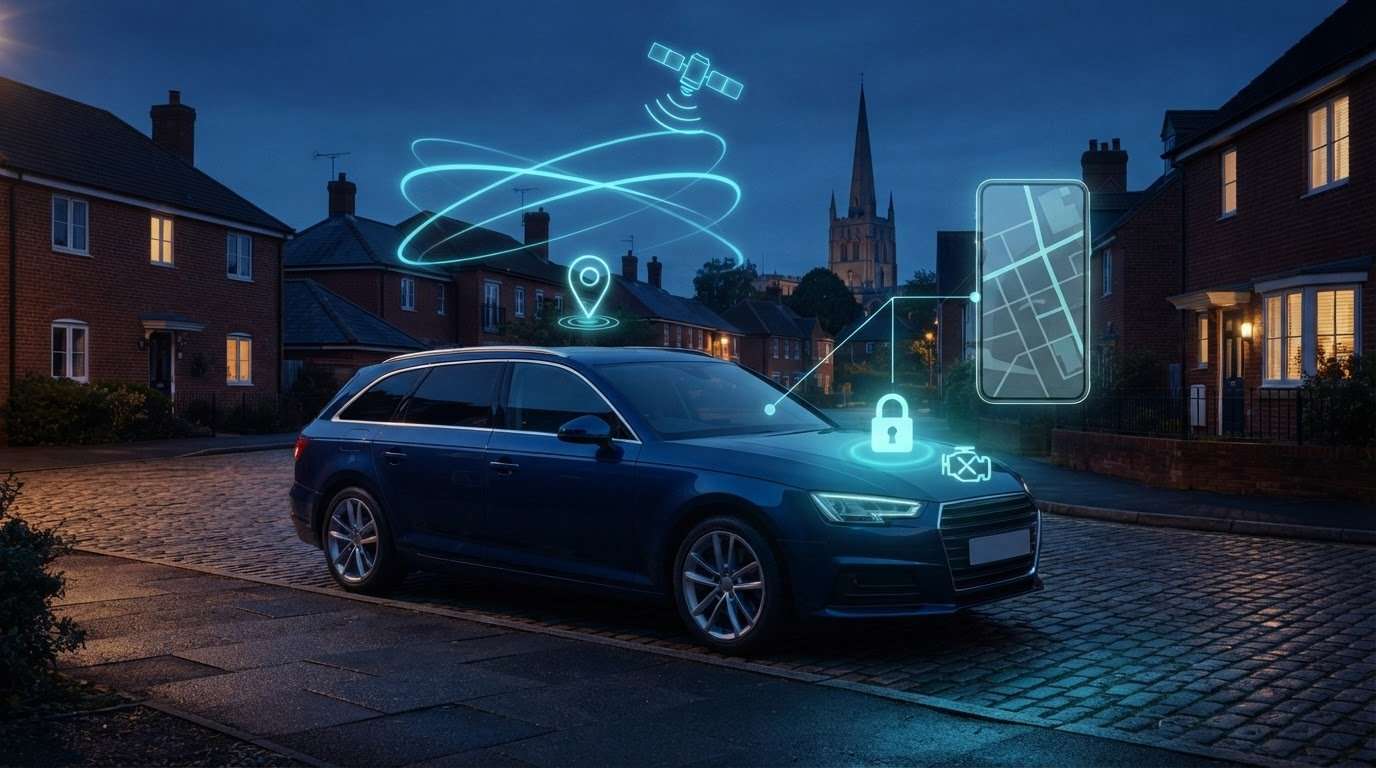
GPS auto tracking uses location data to help track a vehicle. A GPS tracker determines its position using satellite signals, then makes that information available through a connected system or service. The phrase GPS AUTO TRACK doesn’t necessarily refer to a specific device. It may describe the technology, the software used to view a vehicle’s location, or a product or service name.
For a UK vehicle owner, the important question is what the tracker is designed to do: provide location. That helps you establish where a vehicle is, but it doesn’t prevent someone from taking it. A tracker’s location function alone won’t stop the engine from starting or guarantee that a stolen vehicle will be recovered. Those outcomes depend on other factors, including the equipment and service in use and what happens after a theft.
A physical GPS tracking unit is installed in or on a vehicle and forms part of a tracking setup. Information and features differ between devices and services, so don’t assume every system provides the same details or updates at the same frequency. Compare the documented functions with your needs rather than relying on the general label “GPS tracker”.
- What it supports: finding or checking a vehicle’s reported location.
- What it doesn’t establish on its own: theft prevention or guaranteed recovery.
- What to compare: the device, how you view the information and the features stated for that setup.
What information does a GPS vehicle tracker provide?
Vehicle location is the central purpose of a GPS tracker. Depending on the device or service, the information may appear in a compatible app or another interface. Display and refresh behaviour varies, so don’t assume every tracker provides continuous live updates. Location data can show where a vehicle is reported to be, but it can’t confirm recovery if the vehicle is stolen.
Is GPS Auto Track a tracker, an app or a general term?
Similar wording in search results can refer to different things. A vehicle tracker is the physical unit that collects location data; an app or other software lets you view that information. A service name may refer to a particular offering, but the name alonedoesn’tt explain its features. Read the product details and distinguish the hardware from the software used to access tracking information.
How GPS auto tracking works from vehicle location to useful information
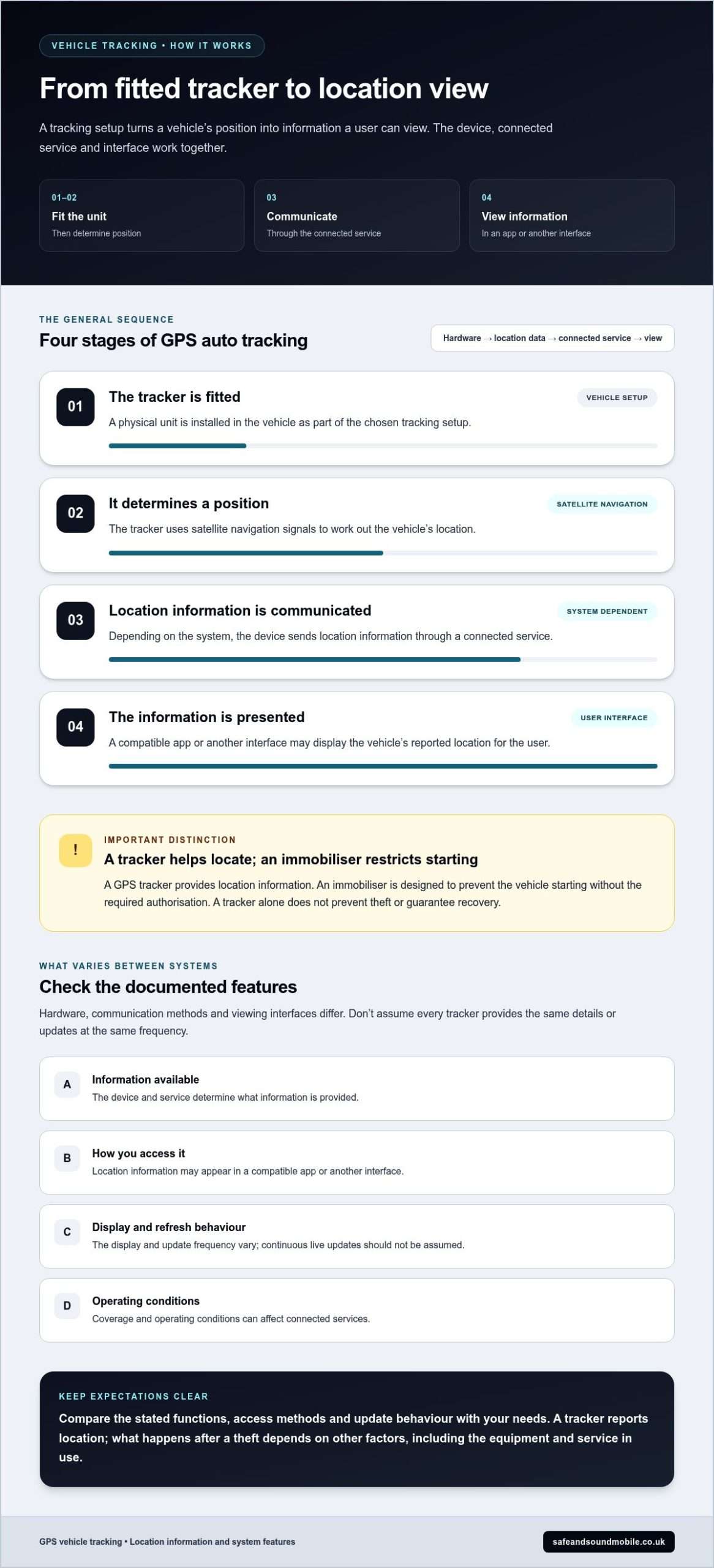
A vehicle tracking setup collects data from a fitted device and delivers it through a connected service. Hardware, communication methods and viewing interfaces vary, so the steps below describe the process in general terms. In brief, a tracker determines a position using satellite navigation, communicates location information through its connected service and presents it for the user to view.
The process usually follows this sequence:
- The tracker is fitted. A physical unit is installed in the vehicle as part of the chosen tracking setup.
- It determines a position. The unit uses satellite navigation signals to work out the vehicle’s location.
- Information is communicated. Depending on the system, the device sends location information through a connected service.
- The information is presented. A compatible app or another interface may display it for the user.
This sequence shows how a vehicle tracker becomes information a user can view. It doesn’t mean every system uses the same communication method, app or display. The tracker and interface are parts of a wider setup, and their functions depend on the product and service.
From location signal to a tracking view
Satellite navigation signals let a tracking unit determine its position. A connected service can then make location information available through an app or another interface. The user-facing display varies between systems. Check the product details to see how a particular setup presents information, rather than assuming that every device has the same interface and functions.
The display is only one part of the overall setup. Read a map marker, status label or other on-screen detail according to the guidance for that specific service. If a vehicle’s reported position seems unclear, use the system’s instructions to understand what the display represents instead of concluding the map alone.
What can affect the information a tracker shows?
The tracker’s design and connected service determine what information is available and how it’s presented. Coverage and operating conditions can also affect connected services. Check the product information for specific functions, access methods and update behaviour. This keeps your expectations tied to documented features rather than assumptions based on the general term “GPS tracker”.
Professional fitting is a practical part of setting up a vehicle tracker. Safe & Sound Mobile installs insurance-approved vehicle trackers and offers mobile fitting across the UK. Explore professionally fitted vehicle trackers to find out about installation.
GPS tracker vs immobiliser: what each does for vehicle security
A GPS tracker and an immobiliser address different parts of vehicle security. A tracker provides location information to help locate a vehicle. An immobiliser is designed to restrict the vehicle from starting without the required authorisation. GPS AUTO TRACK can support t vehicle searches, but it isn’t a physical theft-prevention measure and can’t guarantee recovery.
Use this comparison to see the difference:
| Security measure | Purpose | Typical role | Practical limitation |
|---|---|---|---|
| GPS tracker | Provides vehicle location information. | Can help establish a vehicle’s location. | Location tracking alone doesn’t prevent theft or guarantee recovery. |
| Immobiliser | Restricts the vehicle from starting without the correct authorisation. | Acts as a preventative layer against unauthorised use. | It doesn’t provide the vehicle’s location if it is moved. |
Neither device guarantees protection from every theft scenario. A tracker provides location information; an immobiliser is meant to make unauthorised starting harder. They aren’t interchangeable, and choosing one doesn’t automatically give you the other’s function.
When does a tracker make sense alongside an immobiliser?
Consider both if you want different security functions in the same plan: an immobiliser is intended to restrict starting, while a tracker can help locate the vehicle. This layered approach combines prevention-focused and location-focused measures, but it can’t promise that theft will be prevented or recovery will follow. Safe & Sound Mobile installs vehicle trackers and advanced immobilisers, including Ghost.
Start with the risk or requirement you want to address. If your priority is limiting unauthorised starting, focus on the immobiliser’s role. If you need access to vehicle location information, consider a tracker. If you’re weighing both, compare each device by its stated function instead of assuming one covers the other.
What does an insurance-approved tracker add?
Safe & Sound Mobile installs insurance-approved Thatcham S5 and S7 tracker categories. The appropriate category depends on your insurer’s requirements and your circumstances, so read your policy wording before choosing. An insurance-approved label doesn’t mean every policy has the same condition, and it doesn’t guarantee a claim outcome or vehicle recovery.
Keep two questions separate: what does your policy require, and what security function do you want? Check the category stated in your policy wording, then compare it with the tracker’s documented details. This helps you avoid choosing based only on the general term “GPS tracker” or assuming all tracking systems meet the same insurance conditions.
How to assess a GPS auto tracking option in the UK
Choose a vehicle tracking option by starting with your purpose, not the product label. You may want location information for your own use, need to meet a condition in your motor insurance policy, or want both. The right setup depends on those needs and the tracker’s stated features. Don’t assume every system offers the same functions or satisfies every insurer.
Use this checklist before making a decision:
- Set your priority: Decide whether you want to access your vehicle’s location, meet a stated insurance requirement, or do both.
- Read your policy wording: If your insurer specifies a tracker or category, use the exact wording rather than relying on general claims about insurance approval.
- Compare documented features: Check what the particular device and connected service say they provide. Don’t assume features from the phrase GPS auto tracking.
- Consider installation: Find out whether your chosen tracker needs professional fitting, particularly if you’re selecting an insurance-approved device.
- Think about everyday access: Consider how you expect to view tracking information and whether the stated access method suits your routine.
Check the. purpose and insurance requirement first
Start with the outcome you need: locating a vehicle, meeting an insurance condition, or both. If your policy names a tracker category, use that wording as your reference. Requirements vary by policy, so don’t assume one category applies to every driver or vehicle. Keep the security features you want separate from the conditions your insurer sets.
This check can help prevent a mismatch. A tracker may suit your need for location information but still not be the category specified in your policy. Similarly, choosing a device described as insurance-approved doesn’t mean it meets your policy’s terms. Compare the exact category and conditions in your documents with the tracker’s information.
Consider fit and everyday use.
Professional installation can be an important part of a tracker setup, especially when choosing an insurance-approved device. Safe & Sound Mobile supplies and installs insurance-approved Thatcham S5 and S7 trackers. For everyday use, consider how you’ll access the location information and whether the stated method works for you.
Before deciding, note your priorities and compare them with the tracker’s product information. Look for clear details about its category, fitting and available features. Don’t assume update frequency, subscriptions, battery life or compatibility unless those details are stated for the specific option. For more background on vehicle tracking, consult Vehicle Tracking Explained as part of your research.
Once you’ve matched your needs with your insurer’s wording, arrange vehicle tracker installation with Safe & Sound Mobile. Mobile fitting is available across the UK.
Arrange GPS tracker fitting with Safe & Sound Mobile.
Onceyou’vee identified what you need from a tracker and checked any relevant insurance wording, the next step is arranging installation. Safe & Sound Mobile supplies and installs insurance-approved Thatcham S5 and S7 vehicle trackers, with professional mobile fitting at customer locations across the UK.
With mobile fitting, we install at your location rather than requiring you to travel to a fitting site. It’s a practical way to have a vehicle tracker professionally installed. Tracker installation is a vehicle-security service, separate from arranging your vehicle insurance.
What to expect from mobile tracker installation
Safe & Sound Mobile’s technicians fit vehicle security equipment at customer locations across the UK. Professional installation means you don’t need to interpret technical fitting instructions yourself. Details depend on the tracker you select, so focus on the specific device and its intended use rather than assuming every installation or tracker works the same way.
Before arranging fitting, be clear about your purpose. You might choose a tracker to meet a policy condition or to add location tracking to your vehicle-security plan. If your insurer specifies a tracker category, use the exact wording in your policy when selecting an option.
- Identify your priority: Decide whether you want location tracking, to meet an insurance condition, or both.
- Check the policy: Match any specified tracker category to your insurer’s wording.
- Choose professional fitting: Arrange mobile installation at your location with Safe & Sound Mobile.
Choose tracker fitting that matches your security needs
A tracker provides vehicle location information, while an immobiliser is designed to restrict starting. Choose each for its distinct purpose. If you’re comparing GPS AUTO TRACK options, base your decision on the tracker’s stated features and your requirements. Don’t assume a device prevents theft or that every option meets an insurer’s conditions.
Thatcham S5 and S7 trackers are insurance-approved options for drivers whose needs or policy wording call for a tracker in one of these categories. The right category depends on your policy’s specific requirements. Review the wording before arranging installation, and keep the relevant details so the category you select corresponds to what your insurer has stated.
After choosing a suitable tracker category, professional fitting is a practical next step. Safe & Sound Mobile provides mobile vehicle tracker installation across the UK. Arrange professional vehicle tracker fitting with Safe & Sound Mobile.
Make your next vehicle-security step with confidence
Turn what you’ve learned about GPS AUTO TRACK into a practical decision for your car. Before arranging a fitting, note what you need the tracker to do and keep any relevant policy wording handy. That gives you a clear basis for choosing an option without relying on assumptions about its features or what it can achieve.
A considered installation is a useful step towards putting the right equipment in place for your circumstances. Safe & Sound Mobile installs insurance-approved Thatcham S5 and S7 trackers and fits them across the UK. Choose a solution that aligns with your needs, then arrange professional fitting.
Arrange professional vehicle tracker fitting with Safe & Sound Mobile.
Frequently Asked Questions
What is GPS auto tracking in a car?
GPS auto tracking is a broad term, so check what a particular listing means before treating it as a named product. It might refer to a vehicle tracking device, software used with it or a service name. If you see “PS AUTO TRACK” in a product description, look for the device name and its stated functions to understand what’s being offered.
How does a GPS vehicle tracker show a car’s location?
A tracking view reports the device’s position. If the screen includes a time or status beside that position, use it to judge how current the information appears. Don’t assume the view also provides journey history, alerts or other details unless the tracker’s product information says so. The information presented depends on the particular system.
Can a GPS tracker stop a car from being stolen?
No. A tracker’s location function isn’t itself a physical barrier to theft. Treat it as one part of a vehicle-security plan, not as a substitute for measures intended to deter or restrict unauthorised use. Check whether the system’s stated functions match the protection you want, and don’t assume a location display includes additional security controls.
Is a GPS tracker the same as an immobiliser?
No. They’re different types of vehicle-security equipment, although a system may advertise more than one function. Check the product documentation for each specific function rather than assuming an immobiliser is included because a device has GPS tracking, or vice versa. This is useful when comparing product descriptions that use broad terms such as “vehicle security system”.
Do UK insurers require a Thatcham-approved vehicle tracker?
No single tracker requirement applies to every policy. Check your current policy documents, including any relevant endorsements, for the exact wording and category your insurer specifies. If you renew your policy, change vehicles, or receive updated terms, review the requirement again rather than relying on assumptions based on your previous cover.
Can you fit a vehicle tracker at my home or workplace?
Yes. Safe & Sound Mobile provides mobile installation at customer locations, including homes and workplaces. This can make fitting more convenient if travelling to an installation site doesn’t suit your plans. If the vehicle is kept at a shared or workplace location, consider any site-access arrangements needed for the fitting.
What is the difference between a Thatcham S5 and S7 tracker?
The key difference is that Thatcham S5 includes Automatic Driver Recognition using driver ID tags, while S7 doesn’t. That distinction can help you compare the categories, but it doesn’t determine which one you need. Use your insurer’s wording as a guide, then compare the specified category with the tracker’s documentation before arranging fitting.


About author
Related posts
A dash cam’s recording time depends on its memory card and video quality. For a single-camera setup, a 32GB card stores around 2 to 4... Continue reading

Does a gps tracking dash cam let you find your car if it’s stolen? Not by itself. GPS can add location and journey context to... Continue reading
Could choosing the wrong tracker category leave your insurer’s requirement unmet? The right thatcham approved tracker installation uk starts with the... Continue reading

Car Immobiliser Fitting Shenfield: Options and Preparation Immobiliser fitting in Shenfield should start with the vehicle and the purpose of the installation. An additional immobiliser... Continue reading

Real-Time GPS Tracking Chelmsford: Cars, Vans and Fleets Real-time GPS tracking can help vehicle owners and businesses in Chelmsford view location information through a supported... Continue reading